Welcome to Flightinfo.com

  • Register now and join the discussion
  • Friendliest aviation Ccmmunity on the web
  • Modern site for PC's, Phones, Tablets - no 3rd party apps required
  • Ask questions, help others, promote aviation
  • Share the passion for aviation
  • Invite everyone to Flightinfo.com and let's have fun

Question How to get a red CAS alert for an alternator failure on the Garmin G3X?

Welcome to Flightinfo.com

  • Register now and join the discussion
  • Modern secure site, no 3rd party apps required
  • Invite your friends
  • Share the passion of aviation
  • Friendliest aviation community on the web
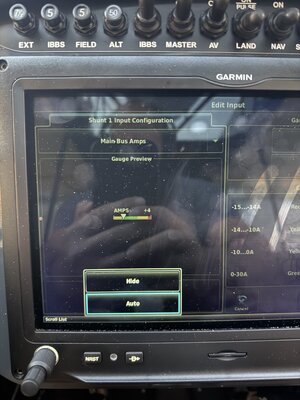
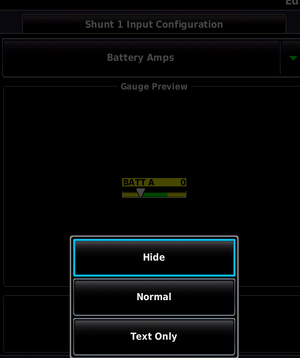
In the post immediately above yours look at the lower left of the screen capture. Display options - "Normal" will include in the side bar. Option - "Hide" will exclude it.

EIS Hide.PNG
 

Attachments

  • IMG_9969.jpeg
    IMG_9969.jpeg
    1.4 MB · Views: 0
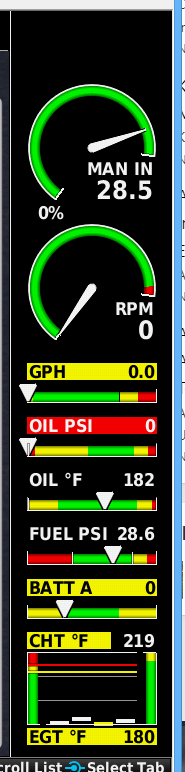
Its a while since I changed this setting. It may depend on how many scales are already displayed on EIS. Perhaps you have no room for another scale.

I do not display any electrical parameters on EIS and don't wish to. All my currents and voltages will alert if abnormal.
 
I think you can show 5 items, it doesn't change the option to display, it just decides what to display. Try turning others off (take a picture first of configs you may want to restore) as I had to do to get mine the way I wanted it. And on that note, capture your config to SD card and then rename it on a computer such as date tagging it so you can keep a history of configs. The config area and options to save/load are near the top of the config screen.
 

Latest resources

Back
Top Bottom