Welcome to Flightinfo.com

  • Register now and join the discussion
  • Friendliest aviation Ccmmunity on the web
  • Modern site for PC's, Phones, Tablets - no 3rd party apps required
  • Ask questions, help others, promote aviation
  • Share the passion for aviation
  • Invite everyone to Flightinfo.com and let's have fun

Question How to get a red CAS alert for an alternator failure on the Garmin G3X?

Welcome to Flightinfo.com

  • Register now and join the discussion
  • Modern secure site, no 3rd party apps required
  • Invite your friends
  • Share the passion of aviation
  • Friendliest aviation community on the web
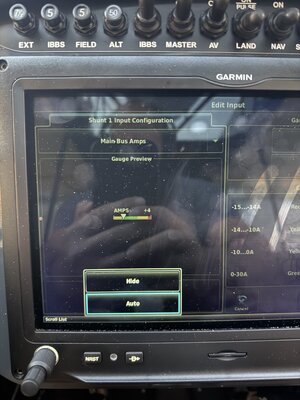
In the post immediately above yours look at the lower left of the screen capture. Display options - "Normal" will include in the side bar. Option - "Hide" will exclude it.

EIS Hide.PNG
 

Attachments

  • IMG_9969.jpeg
    IMG_9969.jpeg
    1.4 MB · Views: 0
Its a while since I changed this setting. It may depend on how many scales are already displayed on EIS. Perhaps you have no room for another scale.

I do not display any electrical parameters on EIS and don't wish to. All my currents and voltages will alert if abnormal.
 
I think you can show 5 items, it doesn't change the option to display, it just decides what to display. Try turning others off (take a picture first of configs you may want to restore) as I had to do to get mine the way I wanted it. And on that note, capture your config to SD card and then rename it on a computer such as date tagging it so you can keep a history of configs. The config area and options to save/load are near the top of the config screen.
 
I flew this morning and experimented when I got back. I was able to add battery amps to my EIS bar without changing anything else.

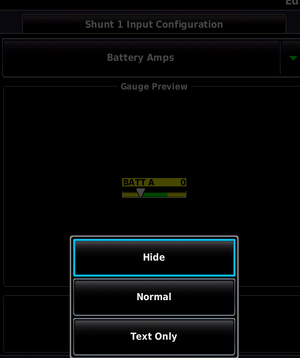
My options were - Hide, Normal, and Text Only.

Before change (Hide active)-

EIS without BAT Amps.PNG


Available options -

BAT AMPS options.PNG

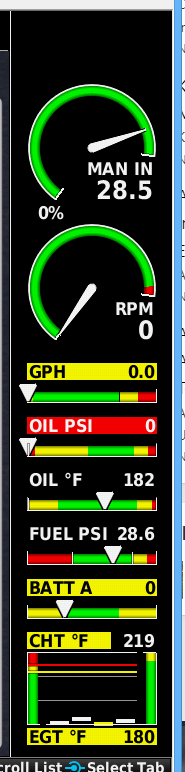
With Normal selected
EIS with BAT AMPS.PNG

What GDU software version are you running?
 
Last edited:
I was interested to see what moved when Battery Amps was added -

Add Bat amps.PNG
 
Do you mind posting exactly how to add AMPs to the EIS side bar? I went through the linked thread but I failed to see where that was laid out.

Were you able to add it or do you still need help?
 
Somewhat unrelated electrical question - I bought a EarthX 900 battery to upgrade my existing battery in my SS. I brought the battery to my A&P to install during my last oil change and he advised me to have the battery install done by an avionics shop as the EarthX battery comes with a BMS fault output that can be integrated and configured into the G3X.

Is that what folks are doing ?
 
Is that what folks are doing ?
No. Not required. Your alerts which need to be configured in the G3X as the voltage bands need to be changed should be sufficient, in my opinion. This was communicated to me as well by Pete from CC when I was installing mine. You can buy the fault light attachment if desired, I'm not using it on mine.

The battery itself should be a simple swap. The G3X requires a config change which I posted mine on this site what I'm using, EarthX provides guidance as well as CC, also in my post on this site if you search the site you should be able to find the thread.
 
Is that what folks are doing ?

No, I did not integrate the warning into my G3X Touch system. I have far better uses for the very few spare GEA 24 input pins.

Wire the LED as instructed by EarthX. Far easier to implement and well within the capability of any competent owner or A&P.
 
Keep in mind if you have too many items set to show the system will prioritize it. I'm not sure how. So you may simply need to turn other items off you don't want in the "show" mode to make something else show. I had to do that with mine. It can only show a maximum number of items due to the space available.
 

Latest resources

Back
Top Bottom