Welcome to Flightinfo.com

  • Register now and join the discussion
  • Friendliest aviation Ccmmunity on the web
  • Modern site for PC's, Phones, Tablets - no 3rd party apps required
  • Ask questions, help others, promote aviation
  • Share the passion for aviation
  • Invite everyone to Flightinfo.com and let's have fun

Avionics Work on my NXCub

Welcome to Flightinfo.com

  • Register now and join the discussion
  • Modern secure site, no 3rd party apps required
  • Invite your friends
  • Share the passion of aviation
  • Friendliest aviation community on the web

lrobichaux

FI Supporter
Joined
Apr 20, 2025
Posts
166
Type aircraft owned
SR-22T / CCrafters EX-3 and NXCub
Base airport
KADS
Ratings
PPL, IR
Update to a previous post that I was considering some avionics upgrades after my avionics CB switch failed. Here is what I had done, and the results:

1) upgraded the avionics bus CB switch from 10A to 15A (shop determined that the existing wiring was sufficient to handle the amperage increase)
2) added a second dedicated back-up avionics power circuit with its own 15A CB switch (in case there's an in-flight CB switch failure like I experienced a couple of months ago)
3) installed a COM1 interlock tie-in as prescribed by CubCrafters to address static in my headset when transmitting and also monitoring both COM1 and COM2
4) upgraded the right ignition IBBS from a 3 amp-hour battery to a 6 amp-hour battery

Tech Aero based at KDTO did a fantastic job. Everything works as desired.

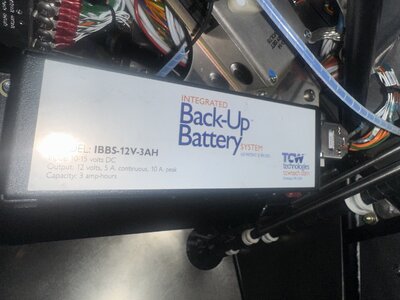
If anyone wants information on #3 above, reach out to Pete or I'm happy to provide information. More importantly, if anyone can make good use of a nearly-brand-new 3 amp-hour IBBS battery, first one to respond in the affirmative below I'll gladly package it up and send to you - no cost. I just want someone to get some use from it, as it's just gonna otherwise sit in my hangar and eventually become unserviceable. It's a TCW IBBS-12V-3AH for experimental installs. Does not have the install harness as that was needed for my upgraded battery.
 
Thanks for the update.

I'm curious how you changed the IBBS battery. I thought the 6 AH battery was 2 3 AH stacked one above the other and required a bigger IBBS housing/case.

It's a while since my IBBS was open. My recollection is there is one battery connector but provision for adding a second one to the circuit board. Did your conversion add a second connector or does the "install harness" act as a "Y" to connect the two battery packs to a single connector?

I'll be happy to accept the unneeded battery.
 
The IFR panel in my 2024 CCX-2300 NXCub with IO-393 came with two 3AH IBBS batteries. One IBBS provides back-up power for the G3X and various LRUs that are needed to provide basic PFD functionality (but does not power COM2, remote audio panel or GPS). The other IBBS provides back-up power ONLY to the right electronic ignition module - this is the one that I upgraded to a 6AH battery (which is one single battery, not two 3AH batteries wired together). Both original batteries came wired from CubCrafters as per described above, so the avionics shop simply unplugged the 3AH battery and plugged in the 6AH battery. The 6AH battery was same length / width (only a very slight bit taller) so it was an easy bolt in replacement using the same harness.

What's your mailing address for the battery?
 
When you say IBBS battery are you talking about the complete IBBS LRU or the battery pack that is fitted inside it?

The IBBS batteries can be seen here - cwtech.com/product/ibbs-replacement-batteries/

I sent you a direct message with contact info.
 
3) installed a COM1 interlock tie-in as prescribed by CubCrafters to address static in my headset when transmitting and also monitoring both COM1 and COM2
Interesting. I have to check to see if I still have this issue as I have COM2 off right now. I have noticed this in the past.
 
Garmin radios have a TX interlock IN and a TX interlock OUT. When two radios are fitted the OUT of each should connect to the IN of the other.

Is CubCrafers delivering dual radio installations without this interlock being wired?
 
I think up until recently, CubCrafters were delivering without the interlock installed. After reporting the problem, Pete emailed me instructions for installing the interlock. I can forward y’all his email if helpful.
 
If you can provide the info here that would be great. How hard is it to do?
 

Attachments

  • IMG_9124.jpeg
    IMG_9124.jpeg
    1.1 MB · Views: 138
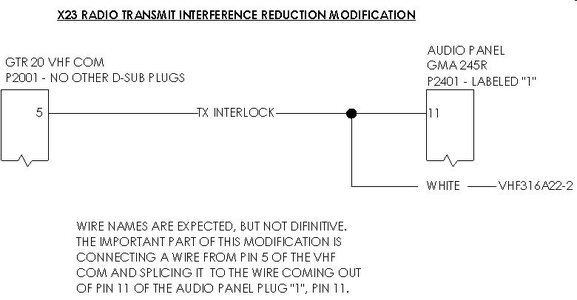
@Neal here is Pete's email regarding the comm interlock. See below and attached file. Hope this is helpful

We believe we have a solution, we do need someone to test the fix ahead of releasing a service document. If you would like to be a beta tester, here is the information that will be coming out, assuming it works. We have done this to one aircraft and it seems to have worked.

Let me know if you have a mechanic who can do this and test it, that would be helpful in getting a second aircraft confirming this works.

The current solution we are looking for feedback on is connecting the wire between the GTR 200, plug P2001, pin 5 to the Audio Panel, GMA 245R, plug P241, pin 11. There is already a wire into pin 11 of the GMA 245R, the white VHF316A22-2. The interlock wire needs to tie into that white wire going to pin 11.
 

Attachments

  • X23 Dual Com Interlock Modification (1).jpg
    X23 Dual Com Interlock Modification (1).jpg
    44.8 KB · Views: 542
Yes, as I suspected, you are describing an "IBBS" as an "IBBS battery" which was, at first, a bit misleading.

IBBS is "Integrated Battery Back-up System" and it contain a custom IBBS battery pack. What is unique about the IBBS is that each cell of the internal battery pack is charged individually. This means the IBBS internal battery can reach full charge even if the charging voltage is less than the fully charged IBBS voltage.

The 3AH IBBS circuit board has only one 7 pin battery connector but there is provision for adding a second connector. I suspect the same circuit board is used in the 6 AH IBBS units and the case is larger to accommodate the double stack battery pack.
 
The TX Interlock mod appears to ground the Audio Panel microphone output (COM 1 MIC AUDIO OUT HI) when COM 1 is transmitting.

It would appear that the normal interlock was always in place and this is an addition to suppress the MIC signal.

Hard to be sure without the complete schematic and I don't have one for an aircraft with the remote audio panel.
 
After the TX interlock mod was installed did you run a COM test for front and rear seat headsets with TX on both COM 1 and COM 2? (4 separate COM checks.)
 
After the TX interlock mod was installed did you run a COM test for front and rear seat headsets with TX on both COM 1 and COM 2? (4 separate COM checks.)
No, but great idea. Never thought about running 4 separate checks. Will do so this weekend and report back.
 
No, but great idea. Never thought about running 4 separate checks. Will do so this weekend and report back.

I'll be interested to hear how that works out. I contributed to a CubCrafters forum thread and provided a test report on a similar issue -


The conclusion I reached from my testing is that all the noise heard when the radio is keyed is pickup from the keyed microphone. Of course that could all be made to go away by shorting out the microphone signal but that makes it impossible to transmit voice.

The only way to overcome the problem reported in that thread is to use a headset with a better noise cancelling microphone.

I have not investigated any dual COM noise issues as my second radio is still on the bench waiting for me to install it.
 
I'll post up here a video with headset audio of me testing all 4 scenarios.
 
I'll post up here a video with headset audio of me testing all 4 scenarios.

I'm more concerned about whether anyone can hear your transmissions for the 4 test scenarios. It really bothers me that the mod CC suggested appears to short circuit the microphone output in some scenarios.
 
I'm more concerned about whether anyone can hear your transmissions for the 4 test scenarios. It really bothers me that the mod CC suggested appears to short circuit the microphone output in some scenarios.
Interesting question ... will test that as well by recording inbound transmissions from a nearby hand held radio. Good point and I'll be interested if the quality of TX / RX is the same for all 4 scenarios. Will post up videos from both perspectives.
 
Tonight's flight I tried having both COM 1 and 2 enabled with MIC 1 active. I definitely get feedback, albeit slight, when transmitting. When I turn off COM 2 it's crystal clear.

Let me know how your change works. Also, are you doing this wiring yourself or having an avionics tech do it?
 
Tonight's flight I tried having both COM 1 and 2 enabled with MIC 1 active. I definitely get feedback, albeit slight, when transmitting. When I turn off COM 2 it's crystal clear.

Let me know how your change works. Also, are you doing this wiring yourself or having an avionics tech do it?
I had an avionics shop do it. Did you try the same test with MIC2 active with both COM1 and COM2 enabled? I'm going to do a proper test this weekend and load up the video results here.
 
Did you try the same test with MIC2 active with both COM1 and COM2 enabled?
No, it was just a quick test of "do I have the issue" and then just went on my way from there :) I may reach out to Pete to get my name on the list and also verify my install is subject to the same issue and will keep this thread updated should I do anything. I'm getting ready to head out in my motorhome for a bit so it may not be until later when I'm ready to screw something up again :)

 
I reached out to Pete and he provided me the attached PDF. It seems there's an earlier option of changing the dip switch on the GMA 245R before making a wiring change. Have you tried this option yet @lrobichaux?

It's not a critical issue but I'm open to making this better as the feedback when transmitting is distracting and concerning albeit minimal, but it's there.
 

Attachments

Last edited:
That more complete write up makes it appear that GTR 20 (COM 2) pin 5 is not wired before the mod.

The correct way to de-sense COM 2 is to correctly wire the TX Interlock (2 wires between COM 1 and COM 2). The TX Interlock should be independent of the audio panel wiring. It is simply COM 1 interlock out to COM 2 interlock in, and COM 2 interlock out to COM 1 interlock in.

Didn't CC provide the schematic for the "as delivered" configuration of dual COM aircraft?
 
Umm, does anyone get schematics other than what's in the AMM? It may be in the EX kit manuals but I haven't and don't plan to hunt for it. COM1 is up front, COM2 and GMA 245R are over the rear seat. Would not be fun wiring.

What is your opinion on the #3 dip switch? I plan to give that a try.
 
The schematics in the current AMM do not cover the dual COM installation. They are low resolution copies of the schematics applicable to the basic Exec Glass configuration (No IFR GPS and single GTR 200 as COM 1). I created my own schematics for the addition of the G5 and GPS 175 to my FX-3.

I did some more research and it appears that the GNC 355 has no TX interlock capability. That was very surprising since it is provided on the GTR 20 and GTR 200 radios.

I would expect that COM 1 PTT could be used to drive COM 2 "TX Interlock In" and that may be what the CC mod is intended to do.

I can see no way to de-sense COM 1 when COM 2 is transmitting.
 
You didn't comment about the dip switch :)

So I went to the plane, toggled dip switch 3 and did some com tests within the hangar. Both COM1 and COM2 transmit were clean. I don't know if there are any side effects I'm not aware of with this dip switch change but so far it seems good.
 
I'm confused! I think ALL dip switches on the unit are in the ON position. Per the manual, that shouldn't be the case. The unit is mounted with the bottom of the unit to the ceiling, all dip switches are towards the top of the unit so I believe that means they are all ON??? If I can't determine on vs. off I'll just put mine back the way it was. Too confusing and doesn't seem to be set per the manual which may be part of the overall problem.

dip-switches.jpg
 
It seems unlikely that the switches would be all ON since the default case is all OFF and CC suggested changing 3 to ON.

It would have been easier if Garmin had marked ON/OFF and the switch numbers on the chassis as I expect the marking on the DIP switch itself is concealed.

I have never seen the remote audio panel but an 8 way DIP would usually have switch 1 on the left and up would be ON. See DIP switch - Wikipedia

However, Garmin says "Per the label attached to the top cover of the unit, the down switch position is ON, the up switch position is OFF."

A call to Garmin support and subsequent marking of the chassis may be in order.

Reminds me of an big airplane program I was working on where one subsystem group decided ground/open discretes should be interpreted in the opposite sense to the interpretation used by every other subsystem.
 
BTW you don't seem to have the latest version of the GMA installation manual.

DIP 5 is allocated - "When set to ON, the Pilot and Copilot have a dedicated PTT key for each COM radio. This allows a crew member to select a COM for transmit using the dedicated PTT key for the radio. Requires software version 3.20 or later." (Ref rev 13)
 

Latest resources

Back
Top Bottom